
What Are Contractor Invoices?
Contractor Invoices are used by workers in Australia who operate under an ABN and are engaged as contractors rather than employees.
When Can a Contractor Send an Invoice?
Before an invoice can be submitted, the shift must be Admin Locked. This means the company has reviewed the completed shift, confirmed the hours worked and finalised the rates payable.
If a shift has not yet been reviewed, the Send Invoice button will be greyed out. Once the shift is approved, the button turns green and the invoice can be sent.
How to Send a Contractor Invoice
Step 1: Sign in to the Crew Portal
Log in using your CrewCard credentials.
Step 2: Open the Invoice Page
From the top menu, click Invoice to open the Crew Invoices page.
Step 3: Send the Invoice
Click the green Send Invoice button next to the completed shift you want to invoice.
Step 4: Receive Confirmation by Email
After the invoice is sent, both the contractor and the hirer or admin will receive a copy of the invoice by email.
What Information Is Included?
Each Contractor Invoice provides a complete summary of the shift worked, billing details and payment information, making it easier for both contractors and administrators to track invoices and maintain accurate records.
- Invoice Number – Unique reference number for the invoice.
- Invoice Date – Date the invoice was generated.
- Invoice To & From – Contractor and company billing details.
- Date Worked – Date the shift was completed.
- Job & Shift Number – References linked to the completed shift.
- Crew Name – Name of the contractor who performed the work.
- Activity – The role or work activity completed.
- Start & Finish Times – Scheduled and actual shift times.
- Hours Worked – Total payable hours for the shift.
- Rates & Extras – Hourly rates, allowances and additional charges.
- Subtotal & GST – Breakdown of invoice amounts before and after tax.
- Paid Amount & Balance Due – Payment status and any outstanding amount.
Example Contractor Invoice
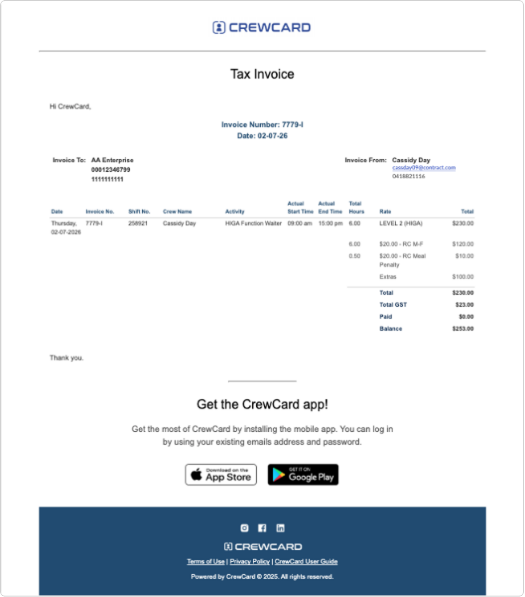
Example of a Contractor Invoice generated through CrewCard.
Why Use CrewCard for Contractor Invoicing?
Faster Payments
Contractors can submit invoices once shifts have been reviewed and approved.
Less Administration
No need to manually create invoices or send details through email.
Better Record Keeping
Each invoice is linked directly to the completed shift and payment details.
Simplify Contractor Invoicing With CrewCard
CrewCard helps labour hire companies and contractors manage invoicing in one connected platform.
Request Demo