
Work Health & Safety Software for Shift-Based Teams
Keep SWMS, toolbox talks, safety inductions, workplace inspections, risk assessments and incident reporting closer to the job. CrewCard gives staff, supervisors, clients and admins mobile access to the safety information they need around each shift.


Keep WHS information where your workforce can use it
CrewCard brings common safety documents and reporting processes into the same workforce system used to manage jobs and shifts, helping teams access the right information before, during and after work.
Safe Work Method Statements
Load SWMS into CrewCard so crew can access the safety plan and job-specific information they need when preparing for work.
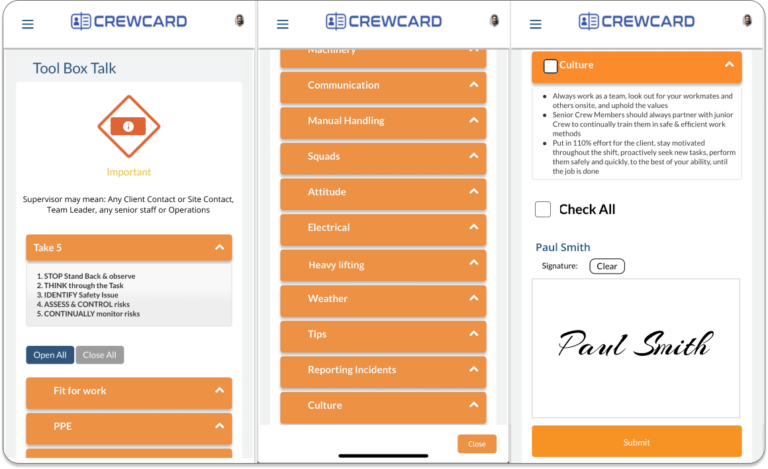
Toolbox Talks
Create a toolbox talk for a job and make it available when crew are on site, keeping key safety information close to the shift.
Safety Inductions
Preload safety inductions that need to be read before a shift so crew can be alerted and review the information before starting.
Workplace Inspections & Risk Assessments
Load workplace inspections and risk assessments in mobile format so relevant safety information can be accessed from the field.
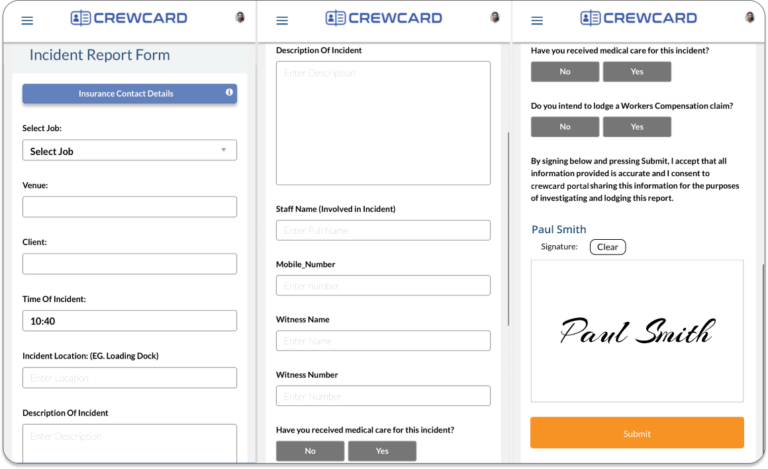
Incident Report Forms
Give crew, supervisors and team leaders a direct way to report incidents that occur during a shift through CrewCard.
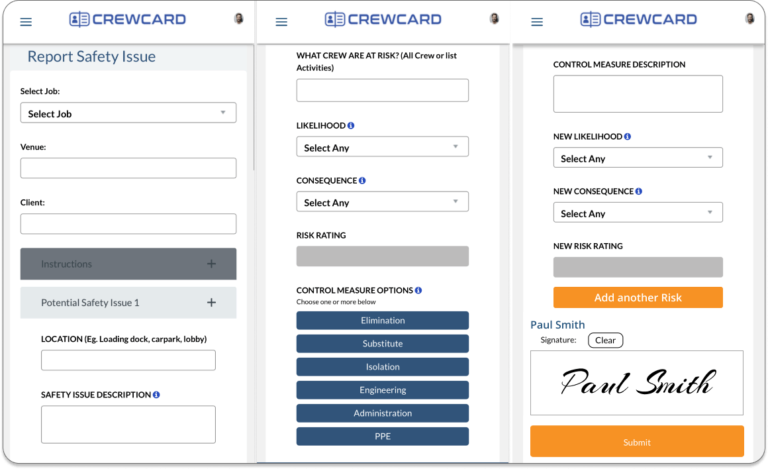
Report Safety
Make it easier for people on site to report hazards and safety issues so the information can be shared with the appropriate team.
Forms Matrix
Review submitted forms from one place, making it easier for admins to monitor records without searching across separate systems.
Build safety information into the way jobs are already managed
The current CrewCard WHS tools are designed around the job itself: prepare the information, make it available to the workforce, report issues from the field and review submitted forms centrally.
Prepare
Load the relevant SWMS, induction, toolbox talk or other safety form.
Notify
Alert crew to pre-shift safety information such as required inductions.
Access
Keep job safety information available in mobile format around the shift.
Report
Allow incidents, hazards and safety issues to be reported from the field.
Review
Use the Forms Matrix to access and monitor submitted forms in one place.
See the safety information your team can work with
These views use the existing CrewCard WHS screens from the current product page, presented inside the redesigned feature-page layout.


Safety information for the people around the job
CrewCard’s current WHS page describes mobile safety information as accessible to staff, clients and admins, with incident and safety reporting also available to crew, supervisors and team leaders.

Crew
Review relevant job safety information and report incidents or safety issues from the field.

Supervisors & Team Leaders
Access job safety information and use the app to report incidents that occur during a shift.

Admins
Load safety documents and use submitted forms and the Forms Matrix for easier access and monitoring.

Clients
Access safety information made available through CrewCard as part of the job and workforce workflow.
Bring submitted safety forms into one view
CrewCard’s Forms Matrix displays submitted forms in one place, giving admins a central point to access and monitor WHS records.
- ✓View submitted forms from one screen.
- ✓Reduce the need to search across separate job records.
- ✓Keep safety records connected with the wider CrewCard workflow.
Keep safety information connected to the work
See how CrewCard can bring WHS forms, workforce scheduling and day-to-day job management into one connected system.