
Qualifying Earnings Configuration Guide
CrewCard now supports the configuration of Qualifying Earnings across multiple payroll components to assist employers in meeting their Superannuation Guarantee obligations and supporting accurate Single Touch Payroll reporting.
Qualifying Earnings may affect
Super & STP Reporting
Employers remain responsible for checking that their setup matches Awards, Enterprise Agreements, contracts and ATO requirements.
Overview
This guide explains what Qualifying Earnings are, how they relate to Superannuation and STP, how to configure them within CrewCard, and the three locations where they can be configured.
Understanding Qualifying Earnings
Qualifying Earnings are earnings that are included when calculating an employee’s superannuation entitlement.
In Australia, employers are generally required to pay Superannuation Guarantee (SG) contributions on an employee’s earnings. While Ordinary Time Earnings (OTE) form the basis of most super calculations, certain Awards, Enterprise Agreements, or employment contracts may require superannuation to be paid on additional earnings.
- Ordinary hours
- Shift penalties
- Certain allowances
- Casual loadings
- Other award-specific earnings
- Certain overtime payments
- Expense reimbursements
- Non-superable allowances
- Other excluded payments
Because superannuation obligations vary between industries, Awards, and agreements, CrewCard allows employers to determine whether specific earnings should be treated as Qualifying Earnings.
Relationship Between Qualifying Earnings, STP and Superannuation
When payroll is processed, CrewCard identifies earnings that have been marked as Qualifying Earnings.
These earnings are then used to:
Correct Configuration Helps Ensure
- Accurate superannuation calculations.
- Compliance with Award and Enterprise Agreement requirements.
- Accurate STP reporting to the Australian Taxation Office (ATO).
Underpayment of superannuation, overpayment of superannuation, payroll reconciliation issues, and compliance risks.
Where Can Qualifying Earnings Be Configured?
CrewCard allows Qualifying Earnings to be configured in three areas.
| Location | Purpose |
|---|---|
| Rules | Controls whether a pay rate contributes to Qualifying Earnings and Super calculations. |
| Direct Payments | Controls whether a manually entered payment contributes to Qualifying Earnings and Super calculations. |
| Allowances | Controls the default Qualifying Earnings treatment for an allowance whenever it is used. |
Section 1: Configuring Qualifying Earnings on Rules
Navigation
Payroll → Rules → Live Rules
A new Qualifying Earnings column is available on the Rules page.
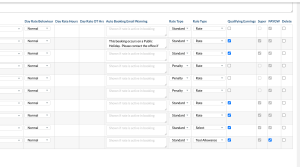
How It Works
Each pay rate can be configured as either:
- Qualifying Earnings = Yes
- Qualifying Earnings = No
To Configure a Rule
| Rate Type | Qualifying Earnings |
|---|---|
| Ordinary Hours | Yes |
| Casual Loading (where superable) | Yes |
| Shift Penalty (where superable) | Yes |
| Overtime | Depends on Award Requirements |
| Expense Reimbursement | No |
Section 2: Configuring Qualifying Earnings on Direct Payments
Navigation
Payroll → Direct Payments → Add Payment
Direct Payments allow payroll administrators to manually create payments such as allowances, reimbursements, bonuses, and payroll adjustments.
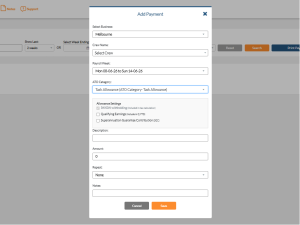
How It Works
When creating a Direct Payment, the system displays an Allowance Settings section that may include:
- PAYGW Withholding
- Qualifying Earnings
- Superannuation Guarantee Contribution (SGC)
To Configure a Direct Payment
The payment contributes to the employee’s Qualifying Earnings Year-to-Date (Q YTD).
The payment is excluded from Qualifying Earnings calculations.
A Tool Allowance entered as a Direct Payment may need to be included in Qualifying Earnings depending on the applicable Award.
Section 3: Configuring Qualifying Earnings on Allowances
Navigation
Payroll → Allowances → Add/Edit Allowance
Allowances can be configured globally and reused throughout the system.
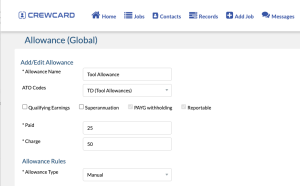
How It Works
The Allowance setup screen includes payroll treatment options such as:
- Qualifying Earnings
- Superannuation
- PAYG Withholding
- Reportable
The Qualifying Earnings setting acts as the default treatment whenever the allowance is applied.
To Configure an Allowance
The allowance is treated as a Qualifying Earning and contributes to Q YTD totals.
The allowance is excluded from Qualifying Earnings calculations.
A First Aid Allowance may need to be treated as a Qualifying Earning under the applicable Award.
Important Notes
CrewCard provides the ability to configure Qualifying Earnings but does not automatically determine whether a payment should be qualifying or non-qualifying.
Employers remain responsible for ensuring their configuration aligns with Applicable Awards, Enterprise Agreements, Employment Contracts and ATO requirements.
We recommend consulting your payroll specialist, accountant, or industrial relations advisor if you are unsure how a payment should be classified.
Summary
Qualifying Earnings determine which earnings contribute to an employee’s qualifying earnings totals and may impact superannuation calculations and STP reporting.
CrewCard provides flexibility by allowing Qualifying Earnings to be configured across Pay Rates (Rules), Direct Payments and Allowances.