Keeping track of your work schedule is now faster and simpler with CrewCard. Our crew shift management feature lets you create, edit and manage shifts directly in the app—no spreadsheets, no messy paperwork. This smart tool saves you time and helps you stay organised, making CrewCard one of the most efficient workforce scheduling software solutions available.
In this blog, we’ll show you exactly how to use the Add Shift option and how it makes managing your shifts easier than ever.
Accessing the Add Shift Option
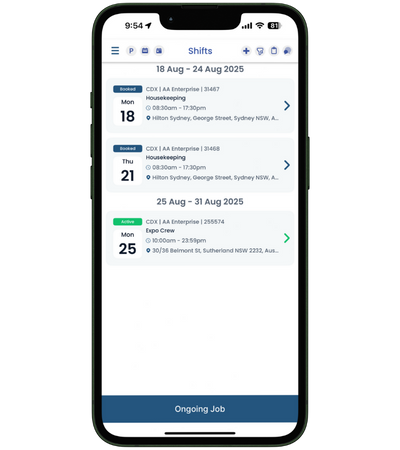
When you log in as a crew member, go to the Shifts page. If your administrator has enabled the feature, you’ll see a ‘+’ icon at the top of the page next to the filter icon.
Tap the ‘+’ icon to open the shift creation form.
Alternatively, you can add shifts from the Daily page.
TThis flexible workflow is designed to support industries where schedules change quickly—such as events, hospitality, construction and healthcare—making CrewCard the perfect employee scheduling app. Best of all, crew can add their own shifts directly, so there’s no need for jobs to be created in advance.
Creating a New Shift
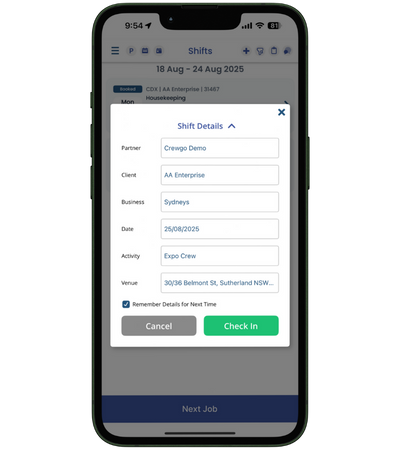
The Create New Shift form allows you to enter important details such as:
Partner
Client
Business
Date
Activity
Venue
Once complete, you can:
Tap Check-In to confirm your shift.
Tap Cancel to discard the entry.
You’ll also see a draggable timeline bar (time picker), which makes it easy to adjust your start and end times with just a swipe.
Save Time with “Remember Details”
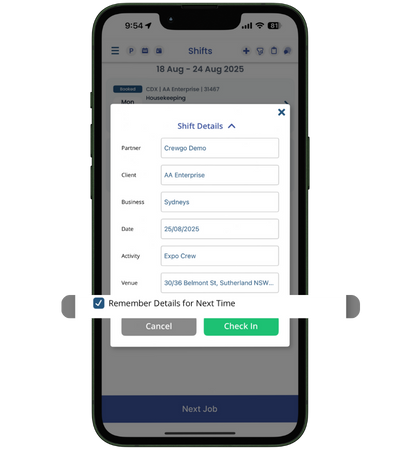
To speed things up, tick the “Remember Details for Next Time” box. This feature automatically pre-fills your shift details the next time you create one, saving you from re-entering the same information over and over again.
This makes the app more efficient than traditional scheduling systems, helping businesses reduce admin and helping staff focus on the job at hand.
Why it Matters?
The Add Shift feature is designed for industries that rely on fast, accurate scheduling. Whether you’re working in event staffing, logistics, hospitality, nursing or construction, CrewCard makes it simple to log, edit and track shifts in real time.
By combining shift scheduling with time tracking and compliance tools, CrewCard is more than just an app—it’s a complete workforce management platform that helps businesses and crew stay aligned.
✅ Pro Tip: Use the Daily Edit option for even more control. The draggable timeline lets you visually adjust your hours in real time, making shift edits seamless.
Final Thoughts
The Crew Add Shift feature is all about convenience, speed, and accuracy. Instead of wasting time on paperwork or back-and-forth communication, crew members can manage their own schedules instantly from their phones.
With CrewCard, employee scheduling is no longer a hassle—it’s simple, smart and stress-free.
Take Control of Your Schedule in Seconds
Managing shifts doesn’t have to be complicated. With CrewCard’s crew scheduling app, adding and editing shifts is simple, fast and stress-free. Designed for industries where rosters change daily—such as events, hospitality, construction and healthcare and more.