DELIVERY & COURIER WORKFORCES

Delivery Workforce Management Software for Courier Teams

Delivery workforce management software helps courier operations schedule drivers, assign vehicles, track readiness, attendance, timesheets, payroll and billing in one connected system.
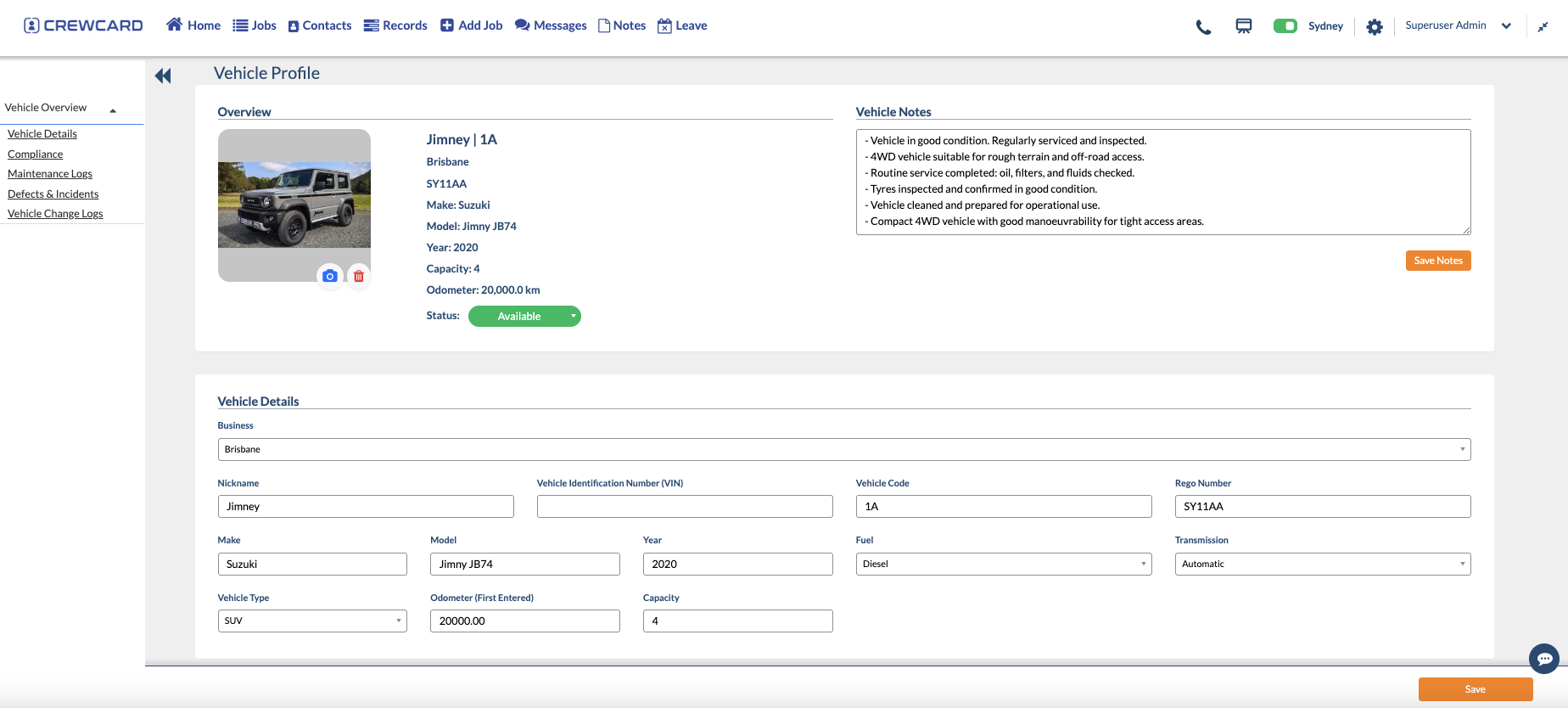
See who is available, ready, confirmed, on shift and approved for pay.
CrewCard delivery workforce management vehicle profile
THE PEOPLE SIDE OF DELIVERY

Delivery Workforce Management for Fast-Moving Operations

Your delivery platform manages the work. CrewCard helps manage the people assigned to it — from shift coverage to approved hours.

Delivery workforce management shift coverage icon

Cover Driver Shifts

Offer and confirm shifts by availability, skills and location.

Delivery workforce management worker readiness icon

Check Worker Readiness

Keep licences, work rights and expiry dates visible before rostering.

Courier workforce management mobile attendance icon

Know Who Is On Shift

Use mobile shift details, GPS attendance and team messaging.

Delivery workforce management payroll icon

Turn Hours Into Payroll

Move approved timesheets into payroll and client invoicing.

ONE CONNECTED DELIVERY WORKFORCE

Delivery Workforce Management Before, During and After the Shift

Keep the same workforce record connected before, during and after each shift.

Before the shift

Get the Right Driver Ready

Check readiness and coverage before the run begins.

Check availability and shift coverage.
Review licences and qualification status.
Offer, confirm and communicate shift details.
During the shift

Keep Mobile Teams Connected

Keep drivers informed while they are on the move.

View job, location and shift instructions.
Check in and out from the mobile app.
Send workforce updates through app, SMS or email.
After the shift

Approve the Hours and Close the Loop

Turn approved hours into payroll and billing.

Review timesheets and breaks.
Approve hours before payroll.
Use approved workforce records for invoicing.
DRIVER SCHEDULING

Fill Delivery Shifts Around the People You Actually Have

Fill shifts faster using availability, skills, location and worker readiness.

Use the Scheduler View

See shifts, jobs and workforce coverage in one place.

Offer Shifts Faster

Send shifts to one driver or a wider group.

Match by Availability & Skills

Use workforce information to assign the right people.

See Gaps Before Start Time

Spot unfilled shifts early and keep delivery runs covered.
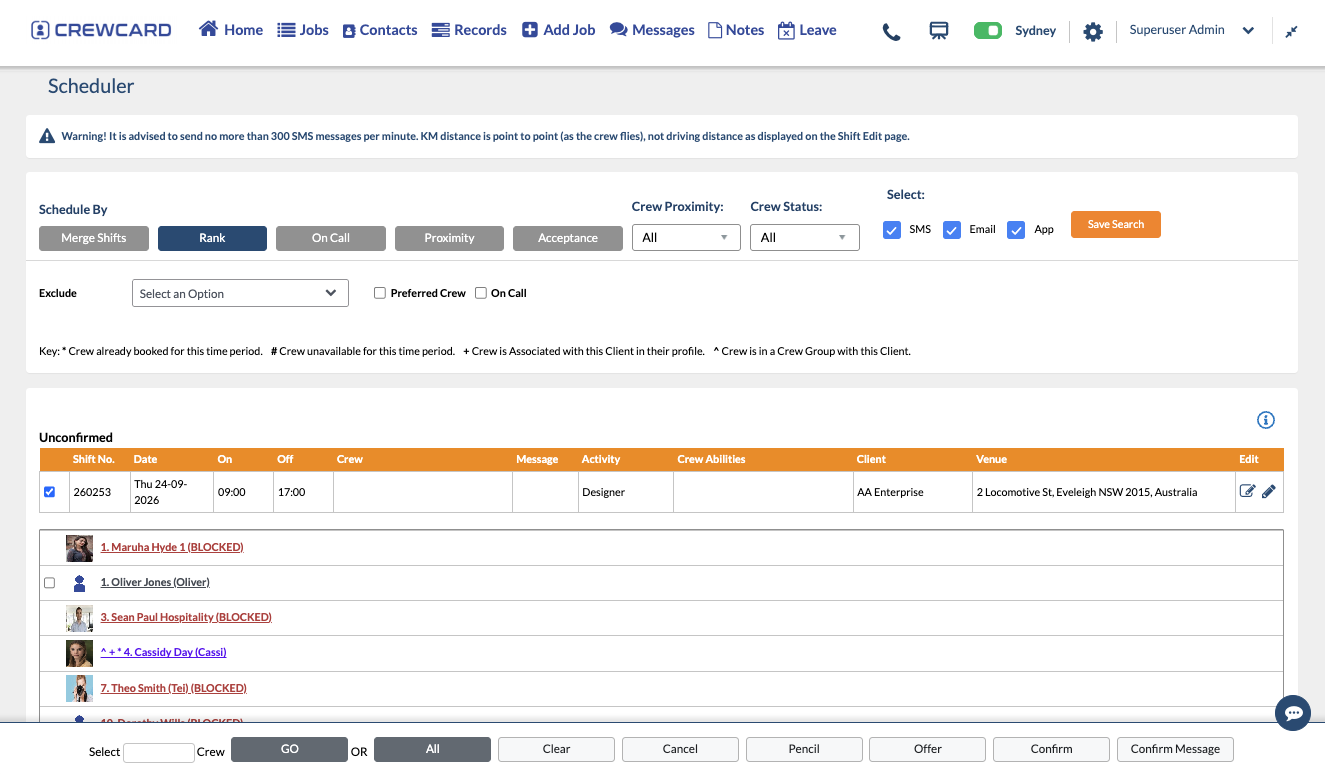
Delivery workforce management scheduler for courier driver shifts
VEHICLES & ALLOCATION

Manage Hired and Company Vehicles Alongside the Shift

Track owned, hired and rented vehicles in CrewCard so delivery teams, vehicles and shift records stay connected.

Record Hired or Rented Vehicles

Add hired vans, utes or trucks when extra fleet capacity is needed.

Assign Vehicles to Delivery Work

Connect vehicles to the shift, job or team using them.

Keep Vehicle Records Visible

Store registration, type, service and compliance details in one place.

Track Defects and Maintenance

Keep a usable history of vehicle updates, defects and operational notes.
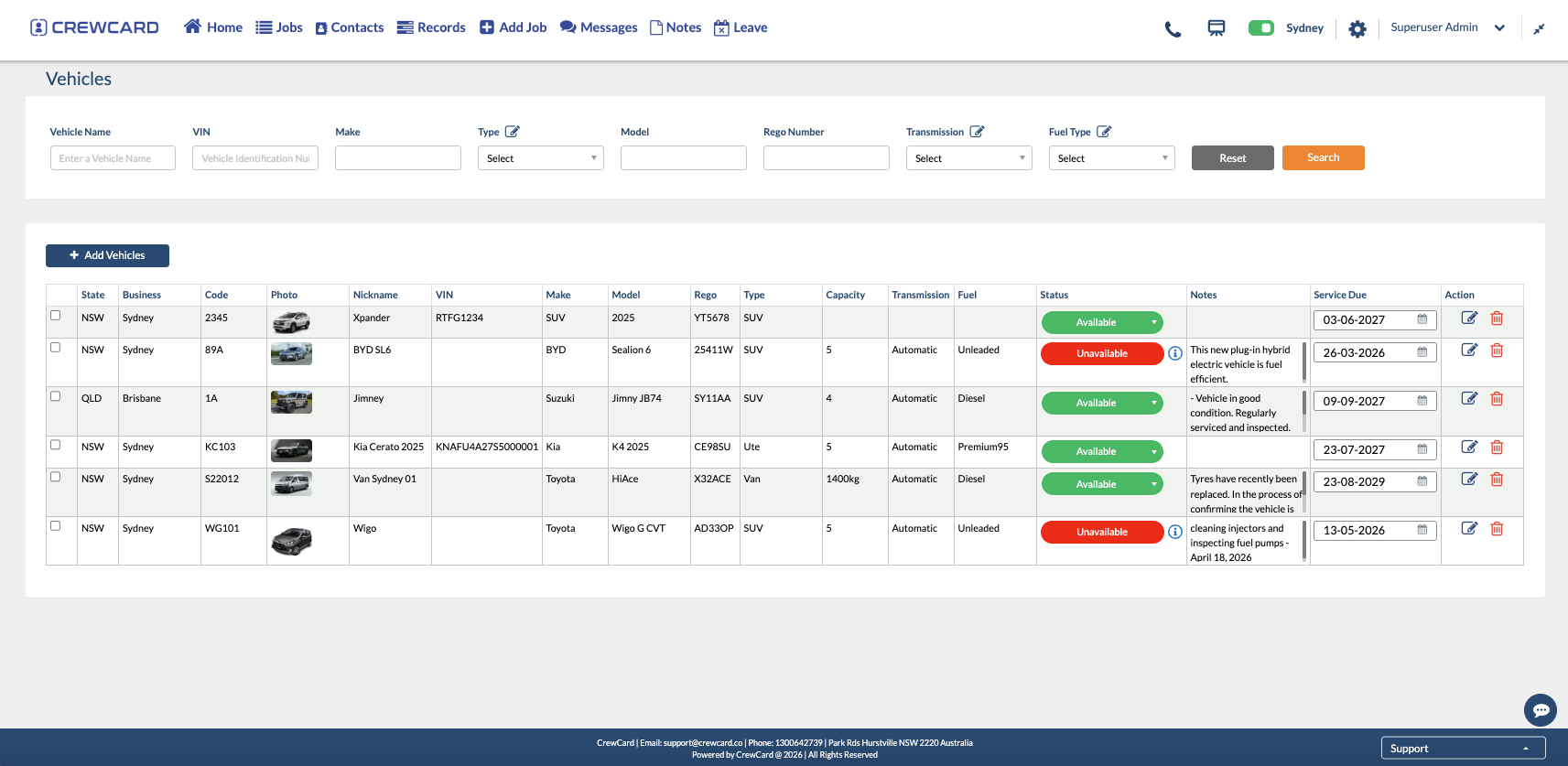
Delivery workforce management vehicle list for hired and company vehicles
DRIVER READINESS & COMPLIANCE

Courier Workforce Compliance Before a Driver Is Sent to Work

See the worker records that matter before assigning the shift.

01

Driver Licences & Expiry Dates

Track licence records and expiry dates in one worker profile.

Qualifications and licences.
Expiry dates and reminders.
Roster qualification rules.
02

Work Rights & Worker Requirements

Keep work rights and worker requirements visible to operations.

Integrated VEVO checks.
Worker documents in one record.
Blocked or incomplete status.
03

Configured Work-Hour Controls

Set worker hour limits where your operation needs them.

Weekly, fortnightly or monthly limits.
Return-to-work restrictions.
Limits visible while scheduling.

Australian workforce resources: Home Affairs VEVO  •  Fair Work record-keeping guidance
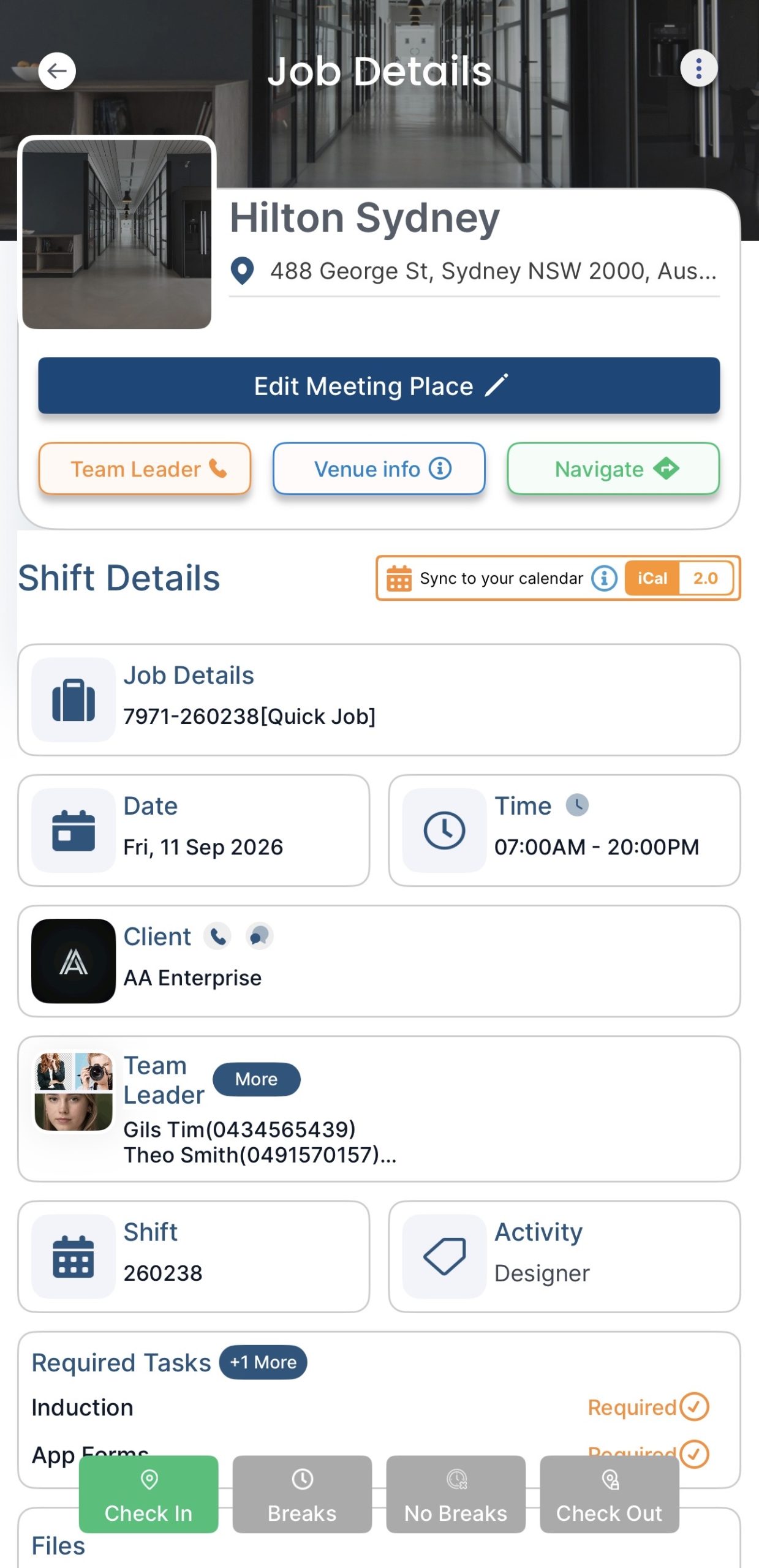
Courier workforce management mobile job details screen
MOBILE WORKFORCE

Give Drivers the Shift Information They Need on Their Phone

Keep delivery teams connected on the move with shift details, mobile check-in and workforce updates.

Shift Details in the App

Time, location and job details in one place.

GPS-Backed Check-In & Check-Out

Capture attendance from mobile teams.

Fast Workforce Communication

Share shift changes through app, email or SMS.

Safety Forms & Incident Reporting

Keep key forms available on mobile.

FROM WORKED HOURS TO ADMIN COMPLETE

Keep Delivery Timesheets, Payroll and Billing Connected

Move approved hours from timesheet to payroll and invoicing without rebuilding the data.
Delivery workforce management work shift icon
Work the Shift Driver completes the scheduled work.
Delivery workforce management timesheet capture icon
Capture Hours Times and breaks are recorded.
Delivery workforce management timesheet approval icon
Approve Timesheet Review the hours before processing.
Delivery workforce management payroll processing icon
Process Payroll Use approved workforce data for pay.
Delivery workforce management invoicing icon
Generate Invoice Use approved hours for client billing.
YOUR DELIVERY TECH STACK

Use CrewCard for the Workforce Behind the Delivery

Keep your route or delivery platform for the goods. Use CrewCard to manage the people behind the work.

Your delivery platform manages the goods. CrewCard manages the workforce.
CrewCard workforce layer Manages the people doing the work
Workforce
Delivery / route platform Manages the delivery itself
Operations
People Recruitment & worker onboarding
Orders Order & delivery booking
Scheduling Driver availability & shift scheduling
Routes Route planning & optimisation
Readiness Licences, qualifications & work rights
Tracking Parcel / consignment tracking
Attendance GPS-backed workforce attendance
Live status Driver route & delivery status
Pay & billing Timesheets, payroll & workforce billing
Customer Proof of delivery & customer ETA
BUILT FOR SHIFT-BASED DELIVERY TEAMS

Useful Across Different Delivery Workforce Models

Built for delivery teams working across changing shifts, sites and service windows.

01 — COURIER

Same-Day & Courier Teams

Manage shift coverage, attendance and payroll for fast-moving courier teams.

02 — LAST MILE

Last-Mile Delivery Workforces

Coordinate the workforce behind high-volume last-mile delivery.

03 — TWO PERSON

Furniture & Large-Item Delivery Crews

Schedule drivers and offsiders, track requirements and capture hours.

04 — MULTI-SITE

Multi-Depot & Contract Delivery Teams

Keep workers, locations and shift records connected across depots and contracts.

DELIVERY & COURIER SOFTWARE FAQS

Common Questions About Delivery Workforce Management

Quick answers about delivery workforce management, scheduling, compliance, attendance and timesheets.

What is delivery workforce management software?
Delivery workforce management software helps a business manage the people performing delivery work — including recruitment, availability, shift scheduling, worker records, attendance, timesheets and payroll. CrewCard focuses on this workforce layer rather than parcel routing or proof-of-delivery functions.
Can CrewCard schedule courier and delivery drivers?
Yes. CrewCard can be used to offer and confirm shifts for delivery workers and can use workforce information such as availability, rank, skills, location and configured requirements during scheduling.
Can CrewCard track driver licences and expiry dates?
CrewCard can keep qualifications, licences, relevant dates and uploaded documents connected to a worker profile. Expiry reminders and qualification rules can also support workforce compliance before rostering.
Can delivery workers check in and out from their phones?
CrewCard supports mobile check-in and check-out with GPS-backed attendance information, helping operations teams keep shift and timesheet records connected for a dispersed workforce.
Does CrewCard replace route optimisation or proof-of-delivery software?
CrewCard is primarily a workforce management platform. Delivery businesses can use it alongside route, order, parcel or proof-of-delivery systems to manage recruitment, driver readiness, rostering, attendance, timesheets, payroll and workforce-related invoicing.
Can CrewCard connect approved hours to payroll and invoicing?
Yes. CrewCard can keep worked hours and timesheet approvals connected to payroll and client invoicing workflows, reducing the need to re-enter workforce data into separate systems.
Does CrewCard support Australian work-right checks?
Yes. CrewCard supports integrated VEVO checks so Australian work-right information can form part of the worker compliance process.
DELIVERY WORKFORCE MANAGEMENT

See How CrewCard Can Fit Around Your Delivery Operation

See how delivery workforce management can connect driver scheduling, compliance, attendance, timesheets, payroll and billing.