
Labour Hire Software Australia for Workforce Operations
CrewCard is workforce management software for Australian labour hire agencies, helping teams manage workers across multiple clients, sites and jobs while keeping availability, qualifications, rostering and client requirements connected.
Connect recruitment, worker readiness, client demand, timesheets, approved hours, payroll workflows and client billing in one system built for casual and shift-based operations.

Workers
People with different availability, skills, licences and employment records.
Jobs & Shifts
Your team sits between client demand and the workers required to deliver it.
Clients
Different sites, contacts, supervisors, requirements and commercial arrangements.
Why Labour Hire Workforce Management Software Needs More Than Rostering
Your workers may be employed by you, but the work itself happens across different client environments with changing requirements.
Client Demand Changes Quickly
Crew numbers, times and requirements can change after a job has already been planned.
Workers Move Between Clients
The same worker can work for different clients, sites and supervisors throughout the week.
Suitability Changes by Job
Availability alone does not tell you whether someone has the skills or qualifications required.
Hours Need to Be Verified
Clients or supervisors may need to confirm what was worked before the job can move forward.
Pay and Billing Are Linked
One completed shift can affect what the worker is paid and what the client needs to be charged.
How Labour Hire Software Connects Workers and Client Demand
The agency needs visibility of the worker, the job they are being sent to and the client receiving the labour.
Your Workforce
Maintain a pool of casual workers whose availability and suitability can change from one job to another.
- Availability
- Skills and abilities
- Qualifications and licences
- Working rights
- Employment records
Client Jobs
Turn client requirements into the actual jobs, activities and shifts your operations team needs to fill.
- Number of workers required
- Activities and skills
- Shift dates and times
- Locations
- Job-specific requirements
Your Clients
Keep the commercial and operational context around each client close to the workforce delivering the work.
- Client contacts
- Sites and supervisors
- Bookings and jobs
- Charge rates
- Timesheet approvals
Filling Short-Notice Client Jobs
Short-notice staffing depends on knowing more than who has an empty calendar. Your team needs to quickly understand who can actually be sent to the client, with rostering software that keeps availability and worker suitability connected. If you are reviewing platforms, see our guide on how to choose rostering software for a casual or shift-based workforce.
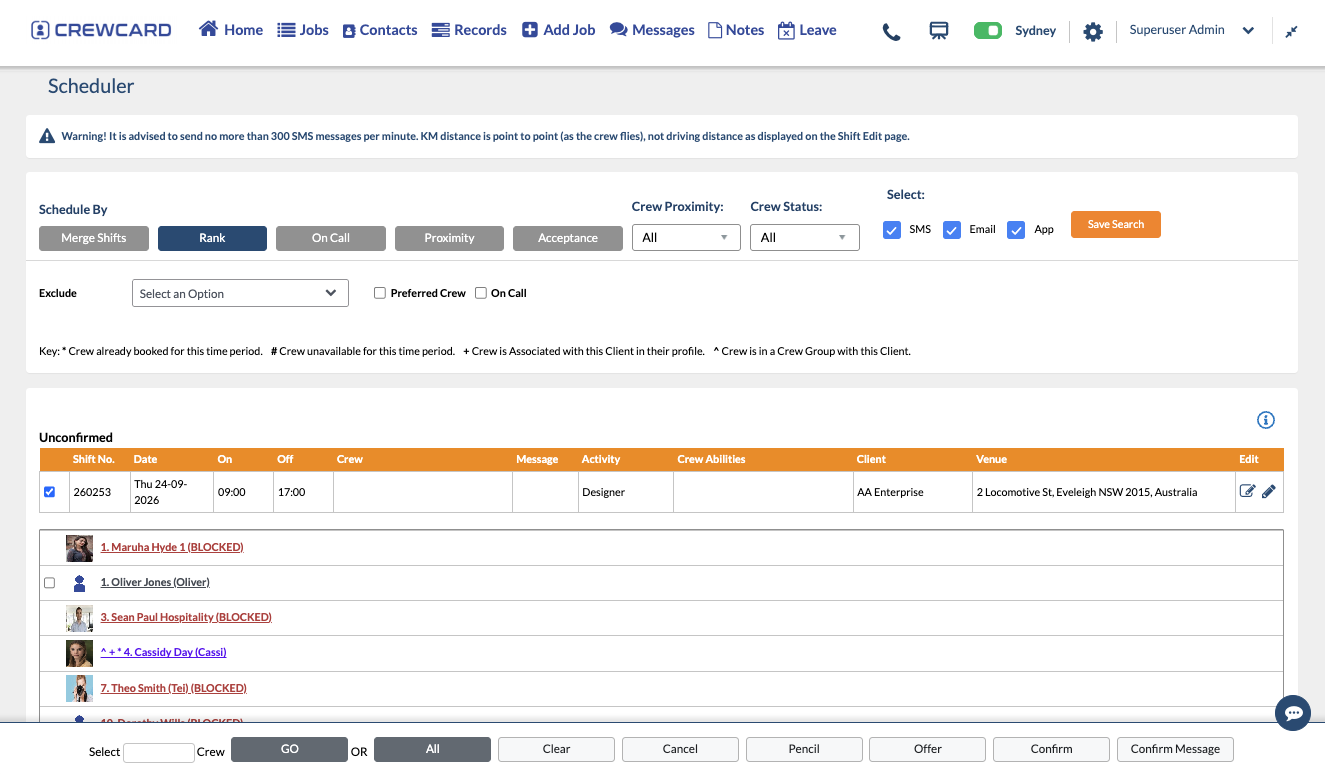
Managing One Workforce Across Multiple Clients
Each client may operate differently. Sites, supervisors, activities, timesheet approval and rates can all vary, even when the worker comes from the same labour pool.
How Labour Hire Connects Worked Hours to Pay and Client Billing
Accurate worked hours matter twice in this operating model: once for paying the worker and again for charging the client. CrewCard keeps timesheets and approvals connected to supported payroll workflows and client invoicing. For a practical example of this process, see our guide to labour hire timesheets.
Worker Completes the Shift
The work starts from an existing client job and rostered worker.
Worked Time Is Recorded
Capture the hours, breaks and other relevant shift information.
Work Is Verified
Keep approval linked to the worker, client and completed job.
Payroll & Client Billing
Continue approved information into supported payroll and invoicing workflows.
Labour Hire Compliance Changes From Job to Job
Operations teams need visibility of the records that affect whether a worker can be sent to a particular activity, client or site. Keep worker compliance, licences and qualifications connected to the same operational record.
For general information about labour supply chains, visit the Fair Work Ombudsman.
White Card
Required qualification is recorded and current.
Client Induction
A client-specific requirement needs attention.
Working Rights
Relevant working-right information has been checked.
Licence Record
The worker needs attention before relevant work.
Where Labour Hire Operations Break Down Between Systems
Workforce operations become harder when worker, client and job information sits in different places and needs to be recreated as work progresses.
Recruitment Ends in One System
Candidate information is collected during recruitment, then operations needs to rebuild the worker elsewhere.
CrewCard can keep recruitment and active workforce records closer together.Availability Is Separated From Worker Readiness
A worker may look free on a roster but still be missing something required for the client job.
Keep availability and relevant worker records visible during allocation.Approved Hours Have to Be Re-entered
Worked hours are approved, then manually rebuilt for payroll, billing or another downstream process.
Keep approved shift information connected to what happens next.Client Context Gets Lost
The worker is rostered, but site details, supervisors, charge rates or approval information live elsewhere.
Keep the worker, job and client relationship connected.If growth is making these handoffs harder to manage, read how to scale a labour hire business without growing your admin team at the same rate.
Keep Recruitment Connected When a Candidate Becomes a Worker
Agencies may already use specialist tools. CrewCard can sit within that wider operating environment.

CrewCard + JobAdder
Recruitment does not stop being useful once a candidate is hired. Keep candidate information moving from recruitment and onboarding into active workforce operations instead of starting again with another disconnected record. For a practical worker-readiness process, see our casual employee onboarding checklist.

Xero
Keep relevant invoicing and accounting information connected with the systems used by your finance team.

CrewPayer & Payroll
Continue approved workforce information into supported payroll workflows for casual workers.
Practical Guides for Managing a Growing Labour Hire Workforce
Explore practical guides on scaling labour hire operations, managing worker hours and choosing rostering software for casual and shift-based teams.
How to Scale a Labour Hire Business Without Growing Your Admin Team
See how connected worker, client, shift, timesheet and billing workflows can reduce repeated administration as your labour hire business grows.
Read the Labour Hire Growth Guide →Labour Hire Timesheets: How to Track, Approve and Manage Worker Hours
Learn how to keep worked hours, client approvals, payroll and invoicing connected when workers move between jobs, sites and clients.
Read the Labour Hire Timesheets Guide →How to Choose Rostering Software for a Casual or Shift-Based Workforce
Compare the rostering capabilities that matter when availability, worker suitability, compliance, changing shifts and timesheets all need to stay connected.
Read the Rostering Software Guide →Built Around Real Workforce Operations
CrewCard was developed inside Show Support, managing casual workers across changing client jobs and locations. That experience shaped how CrewCard connects workers, jobs, approved hours and client requirements.
CrewCard is the first scheduling database we have found that is specifically made for the entertainment industry. The features are extensive, yet the system is easy to use.
Lee Ruggerio Rugged LaborCommon Questions From Australian Labour Hire Businesses
What is labour hire software?
Is CrewCard suitable for Australian labour hire businesses?
Can CrewCard manage workers across multiple clients?
Can CrewCard help us find suitable workers for a client job?
Can we manage worker qualifications and licences?
Can clients or supervisors approve timesheets?
Does CrewCard include payroll?
Does CrewCard integrate with JobAdder and Xero?
Show Us How Your Operation Works
Walk us through how you currently handle workers, client requests, job allocation and approved hours. We’ll demonstrate CrewCard around that process.