
See What’s Happening Across Your Workforce
CrewCard Reporting & Analytics brings workforce activity, hours, shifts, crew statistics and operational reporting together so your team can review performance and make informed decisions from one place.
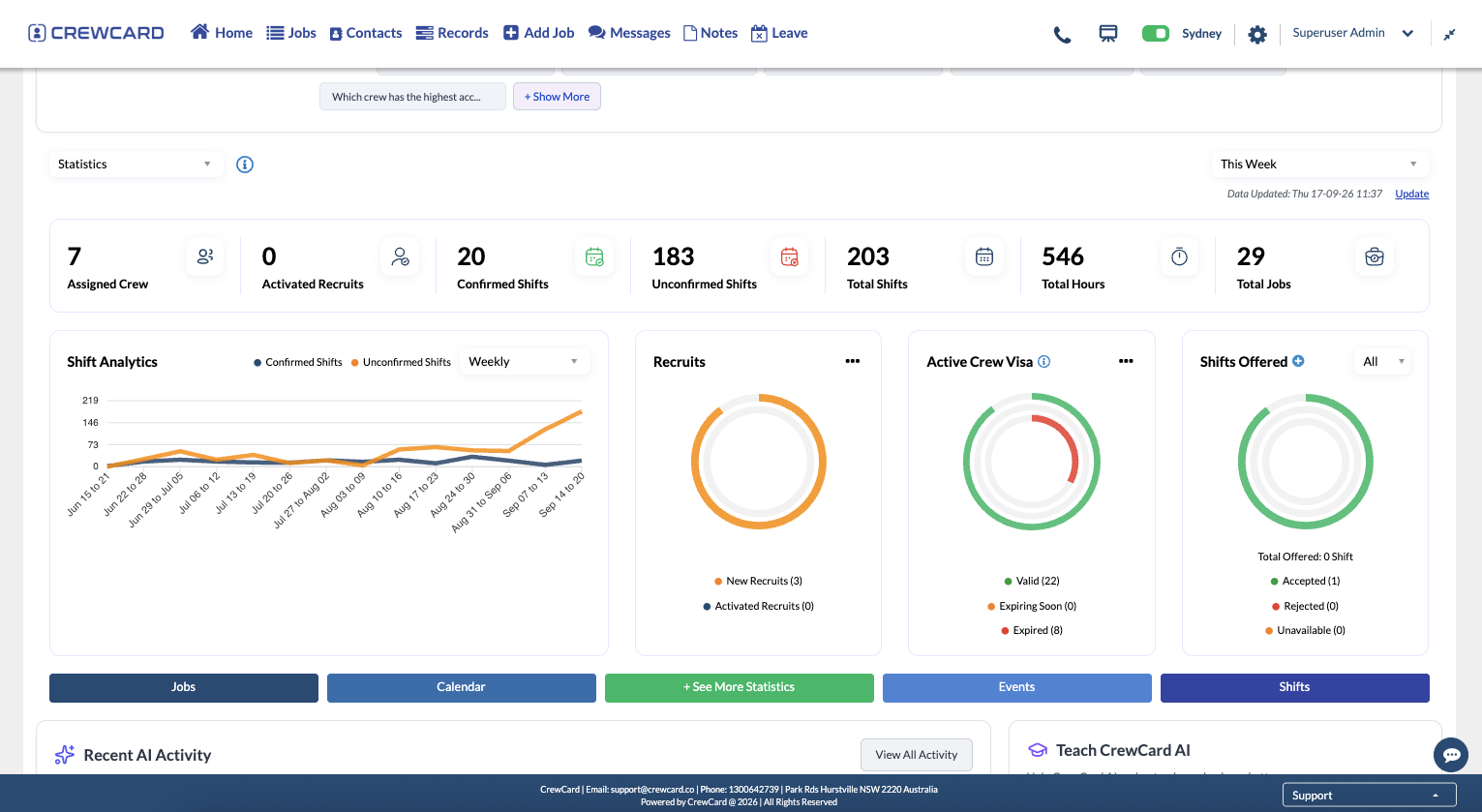


See the Workforce From Different Angles
CrewCard Statistics can display multiple data panels with their own date ranges and filters, making it easier to compare workforce activity across different timeframes, clients, crew or businesses.
Review changes between weeks, months, quarters or custom periods.
Apply Client, Crew and Business filters to focus each comparison.
Use summary metrics to understand the workforce behind each view.
Switch from high-level workforce information to the underlying shift activity.
Reporting for Workforce Operations, Crew and Compliance
Use CrewCard reporting across the areas where workforce information is already being created and managed.

Workforce Statistics
Review jobs, shifts, hours, assigned crew and workforce activity across selected date ranges.

Crew Statistics
Review individual crew information including hours worked, average weekly hours and attendance-related statistics.

Custom Reports
Create reports using selected report types and fields, then duplicate or export them when needed.

Compliance Reporting
Review certifications, onboarding documentation and work eligibility information in supported reporting areas.

Shift & Job Reporting
Use reporting and export tools around scheduled work, job activity and operational workforce records.

CSV Exports
Download supported report and compliance data as CSV for further review, sharing or analysis outside CrewCard.

Build Reports Around the Information You Actually Need
CrewCard Custom Reports lets administrators create and manage tailored reports using selected report types and fields, then duplicate or export the result when required.
Build reusable reports around information your team reviews regularly.
Choose from available report attributes and workforce information.
Reuse existing report structures and download supported report data as CSV.
Understand Individual Workforce Activity
Crew Statistics brings individual crew performance information into one view, including hours worked, average weekly hours and attendance-related statistics.
See total hours and average weekly hours across a selected period.
Review available statistics such as removals, no-shows and short-notice cancellations.
Narrow the statistics to the workforce information you need to review.


Review Compliance Information Before It Becomes a Problem
CrewCard compliance reporting helps administrators review areas such as onboarding documentation, certifications and work eligibility, with filters and CSV downloads available in supported reporting areas.
See outstanding, pending and approved certification information.
Review visa and work eligibility status using supported filters.
Export supported compliance report data for further review or sharing.
One Source of Workforce Information. Multiple Ways to Understand It.
Move from operational data to focused reporting without recreating the workforce information your team already manages in CrewCard.

Use information already created through jobs, shifts and crew records.

Narrow the data by date, Business, Client, Crew or report criteria.

Review different periods or workforce segments side by side.

Use Statistics, Crew Statistics, compliance reporting or Custom Reports.

Download supported data as CSV when it needs to move outside CrewCard.

Take Reporting Data Further When You Need To
Download supported reporting information as CSV for additional review, analysis or sharing outside CrewCard.
Download saved Custom Reports in CSV format.
Download supported compliance reporting information using available filters.
Carry selected workforce information into external review or analysis workflows.
Common Questions About CrewCard Reporting & Analytics
What workforce data can CrewCard Reporting & Analytics show?
CrewCard reporting can show workforce information such as shifts, hours, jobs, crew activity and other operational data depending on the reporting area being used.
Can I compare different date ranges?
Yes. CrewCard Statistics supports multiple data panels with their own date ranges and filters so different workforce periods can be compared.
Can reports be filtered by Business, Client or Crew?
Statistics panels support Business, Client and Crew filters, while other report areas provide filters relevant to the information being reviewed.
Can I create custom reports?
Yes. Custom Reports can be created and managed by administrators, including selecting report types and fields, duplicating reports and downloading CSV data.
Can reporting data be exported to CSV?
CSV downloads are available in supported areas including Custom Reports and compliance reporting pages.
Can CrewCard report on compliance information?
Yes. CrewCard includes reporting around compliance areas such as onboarding documentation, crew certifications and work eligibility status.
Turn Workforce Activity Into Information Your Team Can Use
See how CrewCard can bring shifts, hours, crew statistics, compliance reporting and custom reports into one connected workforce workflow.