
How to Manage Last-Minute Casual Roster Changes
Last-minute roster changes can affect more than one shift. Learn how to handle cancellations, changed hours and replacements without losing track of availability, compliance or confirmed bookings.
A worker cancels at 6:15 am. Your client needs coverage at 8:00 am. Meanwhile, a second team wants to extend its afternoon shift by two hours. Both changes seem small, but together they can affect availability, worker fatigue, client expectations and payroll. The challenge is not just finding a name to fill a gap—it is updating the whole roster accurately.
To manage last-minute casual roster changes, identify exactly what has changed, classify how urgent it is, check worker availability and requirements, confirm the replacement or revised hours, update the central roster and notify everyone affected. Keep the original and revised details in your records so timesheets and invoices reflect what actually happened.
What Counts as a Last-Minute Casual Roster Change?
A last-minute casual roster change is an alteration made close to the start of a scheduled shift or while work is already underway. It may involve a cancellation, an additional worker, a venue change, a changed start time, an extension or a replacement. Different changes create different risks, which is why one blanket response does not work.
Worker cancellation
A confirmed worker cannot attend. You need to release their assignment and assess whether a replacement is necessary.
Earlier or later start
A client moves the start time. Check the worker can accept the change and can travel to the site as required.
Shift extension
The event or job runs late. Check availability, actual hours, rest periods and any approval requirements before extending.
Change in worker numbers
The client adds or removes roles. Confirm the revised quantities, booking terms and who needs to be informed.
What to Do in the First 10 Minutes After a Cancellation
These time windows are suggested triage targets, not a promise that a replacement can be found in ten minutes. The immediate goal is to control the disruption and give the client an accurate update.
Check the cancelled worker, affected job, start time, essential role and client contact. Record when and how the cancellation was received.
Identify workers with suitable skills, real availability, no conflicting assignments and feasible travel time.
Send a clear offer to suitable workers. For an imminent or critical shift, call the most suitable candidates directly.
Track who has responded, who still needs checking and which positions remain unfilled.
Explain what is confirmed, what is still outstanding and when they will receive the next update. Do not promise coverage prematurely.
Step 1: Triage the Roster Change Before Sending Messages
Start with one question: What must be true for the shift to proceed safely and correctly? A cancellation for a role required to open a venue is different from reducing tomorrow’s optional headcount. Capture the original booking, proposed change, who requested it and the latest acceptable decision time.
| Change | First question | Next action |
|---|---|---|
| No-show or cancellation | Is this position essential to start work? | Search for a suitable replacement and advise the client of coverage status. |
| Shift extension | Can the assigned worker remain, and are the hours permissible? | Confirm agreement and relevant conditions before changing finish time. |
| Venue or time change | Can the original crew still attend? | Confirm new details individually; reopen vacancies if needed. |
| Headcount reduction | Which assignments are affected? | Check arrangements, notice and applicable cancellation conditions before advising workers. |
Cancellation or no-show: confirm whether a replacement is essential and activate a qualified shortlist. Shift extension: check the worker's agreement, fatigue and applicable conditions before extending the finish time. Venue or time change: re-confirm every affected worker's ability to attend. Headcount reduction: check cancellation terms and notify impacted workers individually before changing confirmed assignments.
Step 2: Find a Replacement Without Creating Another Problem
When replacing someone, filter the available workforce by the exact shift window, skills, licences, site induction, location and existing assignments. “Available today” does not mean “free from 8 am to 4 pm”, and a worker familiar with the venue may still have a conflicting job.
Check the existing roster
Look across all jobs and clients for overlapping shifts, travel requirements and late finishes the previous night.
Match the actual role
Compare the worker’s abilities and verified qualifications against the work required, not just the job title.
Confirm willingness
A worker may be available but still needs to accept the new offer or proposed change.
Check the arrival plan
Confirm transport, entry gate, reporting contact and whether there is time for induction.
For entirely new urgent staffing requests, read our related guide: How to Fill Short-Notice Labour Hire Shifts Without Calling Every Worker. This article focuses instead on maintaining the accuracy of a roster that already exists.
Step 3: Tell the Right People What Changed
A roster update is not complete when only the scheduling team knows about it. The affected worker, client contact and any supervisor responsible for the shift need the same final information. Clearly distinguish a proposed change from one that has been accepted and confirmed.
“Your shift has changed.”
Leaves the worker unsure about the new time, location, reporting contact and whether they need to respond.
“Please confirm the revised shift.”
“Friday 1:00–9:00 pm at Venue B. Meet Alex at Gate 2. Please accept by 11:30 am.”
Use one source of truth for the latest confirmed assignment. If several people send separate texts and emails, an old message can easily be mistaken for the current shift. Record who approved the change and when the updated details were sent.
Ready-to-Use Roster Change Messages
Templates are examples. Adapt them to your policies, privacy requirements, client arrangements and applicable workplace obligations.
Worked Example: A Cancellation and a Shift Extension on the Same Day
Imagine a labour hire agency supplying casual workers to two Sydney venues. At 7:00 am, one worker cancels a 9:00 am shift at Venue A. At 7:10 am, Venue B asks whether a different worker can stay until 10:00 pm rather than finishing at 8:00 pm. The coordinator needs to resolve both requests without double booking anyone.
Log the cancellation and proposed extension separately, preserving original times.
Filter available replacements for Venue A and review existing commitments.
Record who accepted the replacement offer and whether the Venue B worker agrees to extend.
Update both rosters and give clients and workers their final confirmed details.
The coordinator did not simply place another name in the vacant slot. They checked the replacement was suitable, assessed the proposed extension separately and ensured the revised hours would reach the timesheet process. The times are illustrative, not measured CrewCard results.
What If Nobody Accepts the Replacement Shift?
Don't leave the client assuming the vacant role is covered. Set a decision deadline, then work through the next options in order: recheck the qualified pool, directly contact suitable workers, explore an agreed adjustment to start time or scope, and escalate any critical vacancy to the client. A smaller qualified team or revised arrival time may be possible, but the client must agree to changes and safety or site requirements must still be met.
If no suitable worker is confirmed by the agreed cut-off, send the client an explicit coverage status: unfilled, partially filled or confirmed. Record the alternative proposed, the client's decision and who owns the next action.
Step 4: Check Rest, Notice and Roster Change Obligations
Urgent changes do not remove employment obligations. Depending on the arrangement, an applicable modern award or enterprise agreement may specify roster notice, consultation, minimum engagements, hours of work, breaks and other conditions. An extension that appears straightforward operationally may still need a separate pay or fatigue review.
The Fair Work Ombudsman’s roster guidance explains consultation about changes to regular rosters and notes that awards and agreements can impose additional requirements. Check your applicable award, agreement and worker arrangements rather than assuming every casual roster change follows the same rule.
For example, if a worker finishes at 11 pm and is offered a 6 am start the next day, the seven-hour gap deserves review. Also assess travel and safety even where a particular minimum break rule is not prescribed. The question is not only whether the software permits the booking, but whether the arrangement is lawful and workable.
Step 5: Update the Roster, Timesheets and Client Record
Once the change is confirmed, update the worker assignment and shift details in the central roster. Preserve who changed the record, the original and revised times where available, and why the update occurred. Ensure attendance and timesheets ultimately reflect actual worked hours rather than an outdated booking.
Original shift
Retain a record of what was initially scheduled and which worker was booked.
Changed assignment
Record the replacement, cancellation, revised location or approved new hours.
Approvals and notifications
Keep track of who confirmed the change and whether the worker and client were notified.
Payroll and invoicing
Make sure approved actual hours and billing records use the final, verified information.
How CrewCard Helps Manage Last-Minute Casual Roster Changes
CrewCard brings scheduling, worker availability, shift offers, crew communication and timesheet workflows into one platform. For a change to an existing booking, coordinators can check the roster and worker records before offering replacement work, then maintain the updated assignment within the same operational workflow. Available functions and permissions depend on the account configuration.
Roster visibility
Review scheduled assignments and identify conflicts before confirming a replacement or revised time.
Worker availability
Use availability and worker information to narrow down suitable replacements.
Shift offers and responses
Send clear offers and distinguish interested workers from accepted or confirmed assignments.
Timesheet continuity
Keep updated shifts connected to attendance, timesheets and approval processes.
For a deeper look, see CrewCard Labour Hire Software, our workforce scheduling tools and the guide to preventing double booking.
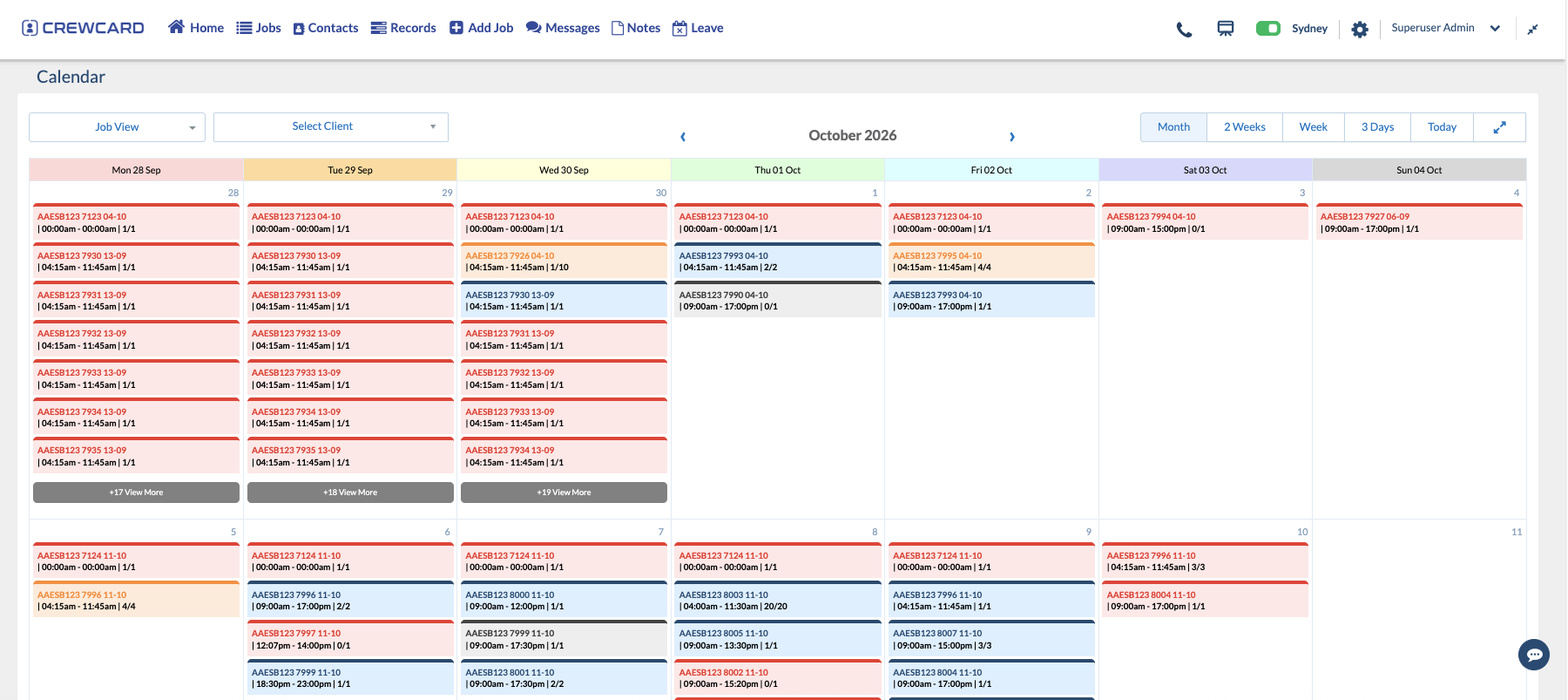
How to Apply This Process in CrewCard
Open the shift details and confirm the original assignment, date, venue and activity.
Review availability, existing shifts and relevant worker qualifications or requirements.
Use the configured shift-offer workflow and monitor responses. Verify acceptance before treating coverage as confirmed.
Record the revised booking, communicate final details and ensure actual worked hours can be reviewed for timesheets.
Roster changes and timesheet changes are not interchangeable. A planned finish-time extension should be reflected in the booking and communicated, while actual worked time should still be checked and approved through the normal timesheet process. Feature visibility and actions may differ by account configuration.
Last-Minute Roster Change Checklist
Change recorded
Do we know what changed, when and who requested it?
Worker suitability confirmed
Have availability, conflicts, qualifications, travel and rest been reviewed?
Acceptance and approval clear
Has the worker agreed and have relevant client or internal approvals been obtained?
Final details sent
Are the roster, worker instructions, client contact and timesheet process aligned?
Last-Minute Casual Roster Changes: FAQs
What is the first thing to do when a casual worker cancels?
Check which shift and role are affected, whether coverage is essential and when a replacement must be confirmed. Then shortlist suitable workers rather than contacting everyone.
Can I change a casual employee’s roster without notice?
It depends on the employee’s arrangements and applicable award or agreement. Some changes require consultation, notice or agreement. Check the relevant rules before assuming a change can be imposed.
How do I avoid double booking a replacement worker?
Review all existing assignments for the full proposed hours, including cross-client work, travel and overnight shifts. A general availability indicator alone is not enough.
Should I edit the existing shift or create a new shift?
Use the workflow that accurately represents the change and preserves necessary records. A replacement assignment, a cancelled shift and an extension are different events and should be recorded accordingly.
What should I do when the client changes the shift after acceptance?
Communicate the revised conditions, check the worker can still do the work, complete any required checks or approvals and issue a clear final confirmation.
Can rostering software prevent every last-minute problem?
No. It can improve visibility, communication and recordkeeping, but people still need to manage safety, employment obligations, client changes and unresolved exceptions.
Keep roster changes under control
See how CrewCard helps casual workforce teams manage availability, shift offers, changing bookings and approved hours in one connected workflow.