
How to Charge Clients Upfront for Labour Hire Jobs with Stripe
Labour hire businesses often commit workers and operational resources before the final invoice has been settled. CrewCard supports full payments, part payments and staged payments, allowing businesses to collect client payments according to their agreed terms while keeping paid and outstanding amounts connected to the invoicing workflow.
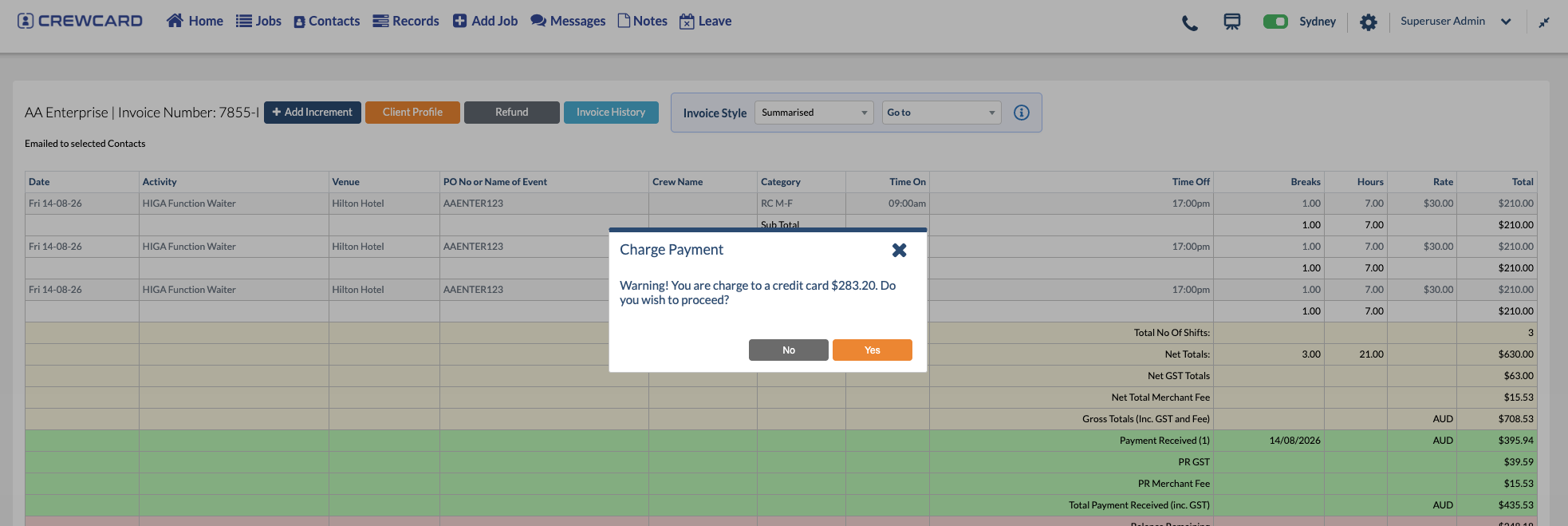
Being able to charge clients upfront for labour jobs can be useful where the agreed client terms require payment before the full job balance would normally become due.
Depending on the payment arrangement, a business may collect the full invoice amount or use CrewCard's Part Payment Required option to request a fixed amount or percentage of the total invoice.
CrewCard supports client payment workflows that can include full payment, part payment or staged payments, depending on the payment terms agreed with the client.
Why collect client payment before the full job balance is due?
Labour hire businesses can incur operational commitments before the final billing process is complete. Depending on the agreement with the client, collecting some or all of the invoice earlier can reduce the amount that remains outstanding later.
Support agreed payment terms
Apply the payment structure agreed with the client, whether that requires full payment, a part payment or several payment stages.
Collect the required amount earlier
Collect the full invoice amount or an agreed portion of it before the remaining balance would normally become due.
Keep payments visible
Payment information remains connected to the invoice rather than being tracked separately in another spreadsheet.
Support staged billing
Where the client terms use several payment points, staged payments can keep each payment connected to the invoice.
How CrewCard upfront client payments work
Businesses can collect the full invoice amount where full payment is required. When only part of the invoice is due, administrators can select Part Payment Required and enter either a fixed amount or percentage.
Review the client invoice and the total amount connected to the job.
Decide whether the client is paying the full invoice or only part of the total amount.
For part payments, enter a fixed amount or percentage according to the agreed client terms.
Once payment is completed, the paid amount and any outstanding balance remain visible in the invoice workflow.
Choose full payment or a part payment
The payment structure can reflect the commercial terms agreed with the client. That may mean collecting the entire invoice at once, requesting a fixed part payment, using a percentage or splitting the total into several stages.
Example: a 50% part payment
This example shows a 50% part-payment arrangement. Where the agreed client terms require full payment, the full invoice amount can instead be collected rather than leaving a remaining balance.
How can the client payment be collected?
CrewCard's payment workflow can be used to process the required client payment, whether that is the full invoice amount or a configured part payment.
Administrators can also email the invoice to the client. Clients can access invoices through the Client Portal, where supported invoices can display a Pay Now option for amounts that remain payable.


Where Stripe appears in CrewCard's payment records
CrewCard's invoice workflow includes Stripe Payment records, allowing administrators to review payment information associated with client transactions.
This gives the finance or administration team a payment record alongside the invoice rather than requiring payment history to be maintained separately.
Stripe provides online payment interfaces for accepting supported payment methods. See the official Stripe Checkout page for current information about Stripe's checkout experience and payment options.
Keep paid and outstanding amounts visible
When might a labour hire business use full or part payments?
The payment structure is a commercial decision between the business and its client. Some jobs may require the full invoice amount to be paid, while others may use an initial part payment followed by one or more later payments.
Full upfront payment
Collect the complete invoice amount where the agreed client terms require payment in full.
Larger labour bookings
A larger invoice may use an initial payment followed by a remaining balance.
Extended projects
Longer projects may use several payment points rather than one payment at the end.
Staged billing arrangements
Multiple stages can help keep each payment and any outstanding balance visible throughout the billing cycle.
Keep labour jobs and client billing connected
CrewCard's invoicing workflow keeps client billing connected to the job information, configured rates and worked hours already managed within the platform.
Job-based invoicing
Create invoices from the same underlying job information used to manage the workforce.
Flexible payment controls
Collect the full invoice amount or use part-payment and staged payment arrangements where required.
Payment tracking
Review paid amounts, outstanding balances and invoice payment history.
Client Portal payments
Give clients access to invoice information and supported payment actions through the Client Portal.
Learn more about CrewCard Invoicing & Quotes and the CrewCard Admin User Guide .
CrewCard supports full-payment, part-payment and staged-payment workflows. Whether full payment or only part of an invoice is required before a job starts depends on the payment terms agreed between the business and its client. Stripe fees, available payment methods and processing conditions may also vary.
Client payment FAQs
Can CrewCard collect the full invoice amount upfront?
Yes. Where the agreed client payment terms require full payment, the complete invoice amount can be collected rather than setting a smaller part-payment amount.
Can CrewCard require a part payment?
Yes. CrewCard's Part Payment Required option allows an administrator to enter an amount or percentage of the total invoice.
Can a part payment be a percentage?
Yes. A part payment can be entered as a percentage of the total invoice rather than only as a fixed amount.
Can an invoice have more than one payment stage?
Yes. Staged payments can be used where the client billing arrangement requires more than one payment before the invoice is fully settled.
Can clients pay outstanding invoice amounts themselves?
The CrewCard Client Portal can provide a Pay Now workflow for supported invoices where an amount remains payable.
Does CrewCard keep Stripe payment history?
CrewCard's invoice workflow includes Stripe Payment records so payment information can remain connected to the client invoice.
Keep client payments connected to your labour jobs
See how CrewCard can connect jobs, rates, invoices, full and part-payment requirements, Stripe payment records and outstanding client balances in one workforce workflow.
Explore Invoicing & Quotes